
18+ Adults Only
Warning: This page contains guidance for accessing adult content. Please leave if you are under 18.
(注意:このページはアダルトコンテンツの利用手順を案内します。18歳未満の方は閲覧をご遠慮ください。)
Disclosure: This page may include promotional links. I may earn a commission at no extra cost to you.
(アフィリエイトリンクを含みます。あなたの負担は増えず、紹介料が発生する場合があります。)
(アフィリエイトリンクを含みます。あなたの負担は増えず、紹介料が発生する場合があります。)
Step 0) Start Here: DUGA Guide Top (まずはここ:ガイドトップ)
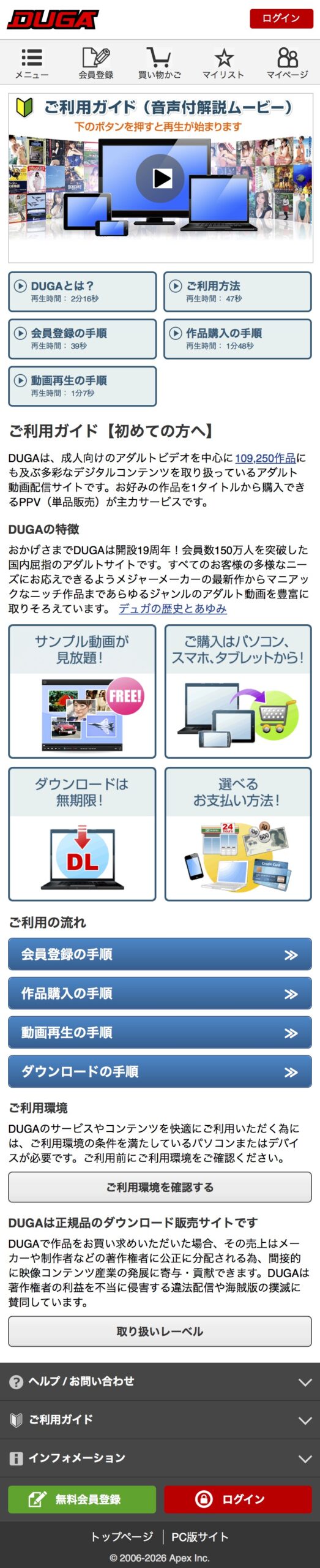
(ガイドトップから「会員登録」「購入」「再生」の順に進めます)
Step 1) Create an Account (Sign Up) (手順1:会員登録)
What you need: Email address + password + your age (18+).
(必要なもの:メールアドレス/パスワード/年齢入力)
(必要なもの:メールアドレス/パスワード/年齢入力)
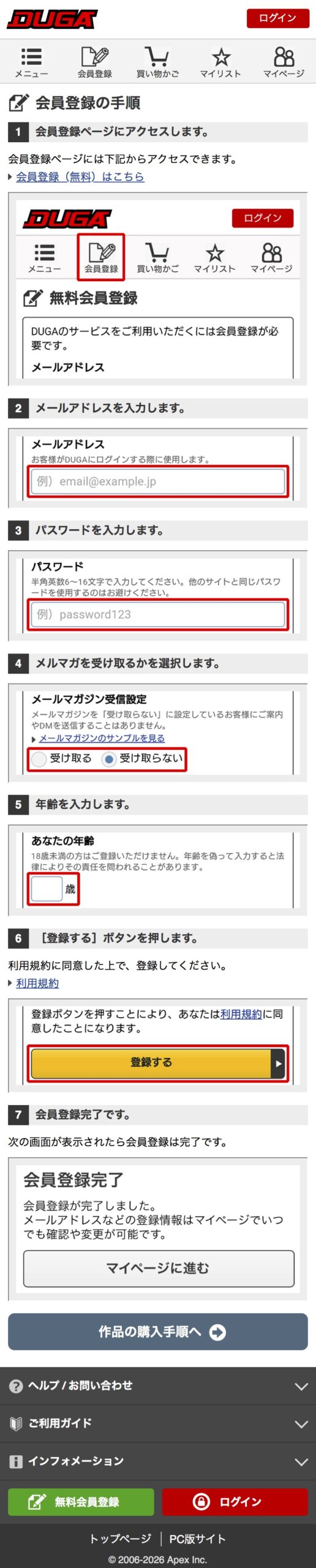
- Enter your email address (valid email you can access).
- Create a password (6–16 characters).
- Choose Receive / Do not receive emails (newsletter).
- Enter Your Age (must be 18+).
- Tap Register / Sign Up.
JP補足:メルマガは「受け取らない」でもOK。年齢は必須。登録ボタンを押すと利用規約に同意した扱いになります。
Step 2) Buy a Video (Checkout) (手順2:作品を購入)

- On the video page, tap Add to Cart (買い物かごに入れる).
- Go to the cart and tap Proceed to Checkout (決済方法の選択へ).
- Select a payment method (credit card etc.).
- Confirm and complete payment.
JP補足:購入後は「マイページ」や購入履歴から再生に進めます。決済画面が英語化されない場合もあるので、ボタン位置を見ればOK。
Step 3) Watch / Stream (Play) (手順3:再生する)

- After purchase, open My Page (マイページ) or your purchase history.
- Find the purchased title and tap Play / streaming option.
- If asked, log in again (email + password).
JP補足:iPhone/Safariで再生できない時は、ブラウザの設定やポップアップ制限が原因のことがあります。まずは公式手順を確認。
Step 4) Download (If available) (手順4:ダウンロード)
Note: Download availability depends on the title/device.
(作品・端末によってDL可否が違います)
(作品・端末によってDL可否が違います)

- Open your purchased title in My Page.
- Tap Download if the option is available.
- Follow your device prompts to save the file.
JP補足:iOSは仕様上、保存場所や再生アプリが絡むことがあります。公式手順の画面どおりに進めばOK。
Ready? Start from the official top page
If you’re ready, open DUGA and follow the steps above.
(準備できたら、DUGAトップから進めよう)
This guide is for navigation only. Please follow all local laws and platform rules.
(本ガイドは案内目的です。各国の法律・規約を守って利用してください)